Select Version of EA Desktop:
The Aliases tab displays previous names that a seismic record may have been assigned.
There are 2 methods to add a new alias to a seismic record:
 Method One:
-
Select the record(s) in the Seismic Properties grid.
-
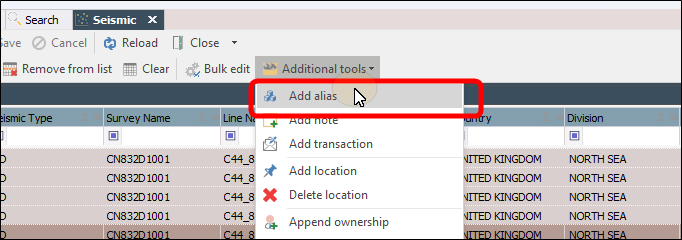
In the Additional Tools drop-down in the menu bar select Add Alias
-
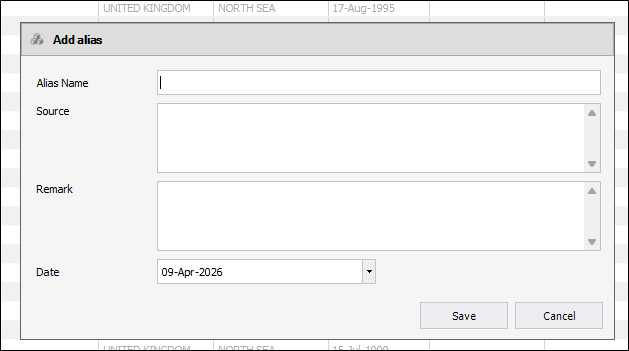
The Add alias window opens
-
After you have filled out the fields, click Save.
-
The window will close and the aliases will appear in the related records Aliases module in the related records panel.
Method Two:
-
Select the record in the Seismic Properties grid.
-
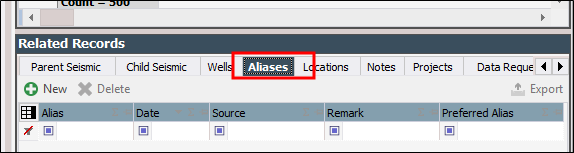
In the Related Records panel click the Aliases tab.
-
Click New.
-
Enter the Alias, and information for the other columns if needed.
-
Click Save.
The Aliases tab displays previous names that a seismic record may have been assigned.
To add a new alias to a seismic record:
-
Select the record in the Seismic Properties grid.
-
In the Related Records panel click the Aliases tab.

-
Click New.
-
Enter the Alias, and information for the other columns if needed.
-
Click Save.